I wasn’t sure if this blog would interest anyone, but I decided to write it thinking that some aspects of my workflow might be useful. I’ll briefly explain how I work and focus on why the introduction of sub-agents in VS Code has been a significant quality boost in my process.
My Workflow
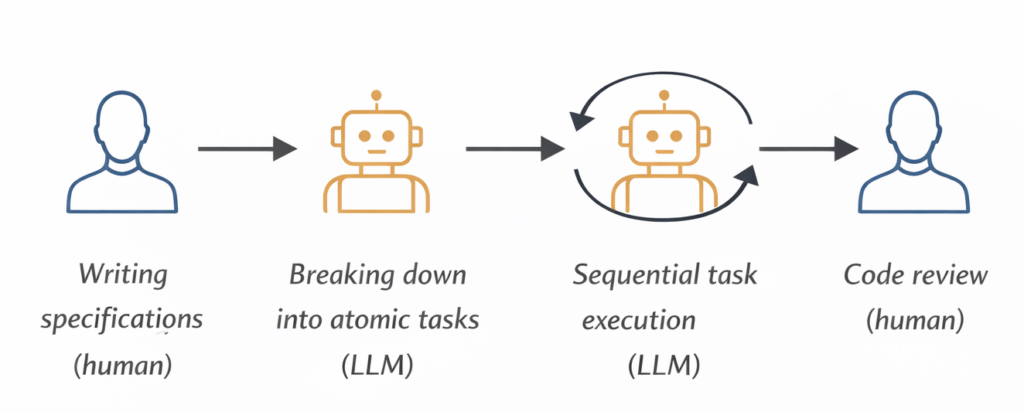
For about 80% of my projects I follow a Spec-Driven Development approach: before starting to work with LLMs, I focus on writing a sufficiently detailed specification and analysis. For the remaining 20% I use vibe coding, mainly for personal projects in languages I don’t know well or for throwaway scripts.
I’ll focus on the Spec-Driven approach, which in my case is very straightforward:
- Writing the specifications (human)
- Breaking down into atomic tasks (LLM)
- Sequential task execution (LLM)
- Review of generated code (human)
For simplicity I’ll stop here, leaving out the overall review and testing phases.
My GitHub Copilot Setup
The flow is simple: I start from a specification file, transform it into atomic tasks, and execute them one at a time. In Copilot I make heavy use of prompt files, callable directly from the chat via /prompt-name, which let me standardize each phase of the process.
Here’s how the project is organized:
- spec/spec.md — the specs written by me (sometimes with LLM support)
- .github/copilot-instructions.md — general instructions passed to Copilot every session, such as coding conventions and project rules
- .github/prompts/generate-tasks.prompt.md — reads the spec and generates tasks in the tasks/ folder, one per feature
- .github/prompts/execute-single-task.prompt.md — executes a single task: implements it, updates its status, and leaves notes for human review
- .github/prompts/execute-all-tasks.prompt.md (legacy) — used to run all tasks sequentially in the same session; it worked, but had a problem I’ll explain in the next section
After the introduction of sub-agents in VS Code, I replaced the legacy prompt with two custom agents that handle the process more robustly:
- .github/agents/Orchestrator.agent.md — coordinates execution and delegates each task to the Executor
- .github/agents/Executor.agent.md — receives one task at a time and executes it in an isolated session
I’ve shared the contents of all these files on my GitHub.
When Context Becomes the Enemy
The critical point of Spec-Driven Development is that if the specifications are extensive and you don’t segment the work across multiple chat sessions, LLM performance tends to degrade — this is the context rot phenomenon.
In practice, every interaction in a chat increases the context the model must consider when responding. After a certain number of exchanges, the context becomes so large that the LLM starts to get confused, losing quality in its responses. This is a scientifically studied and documented problem: as the context window grows, models tend to produce worse outputs.
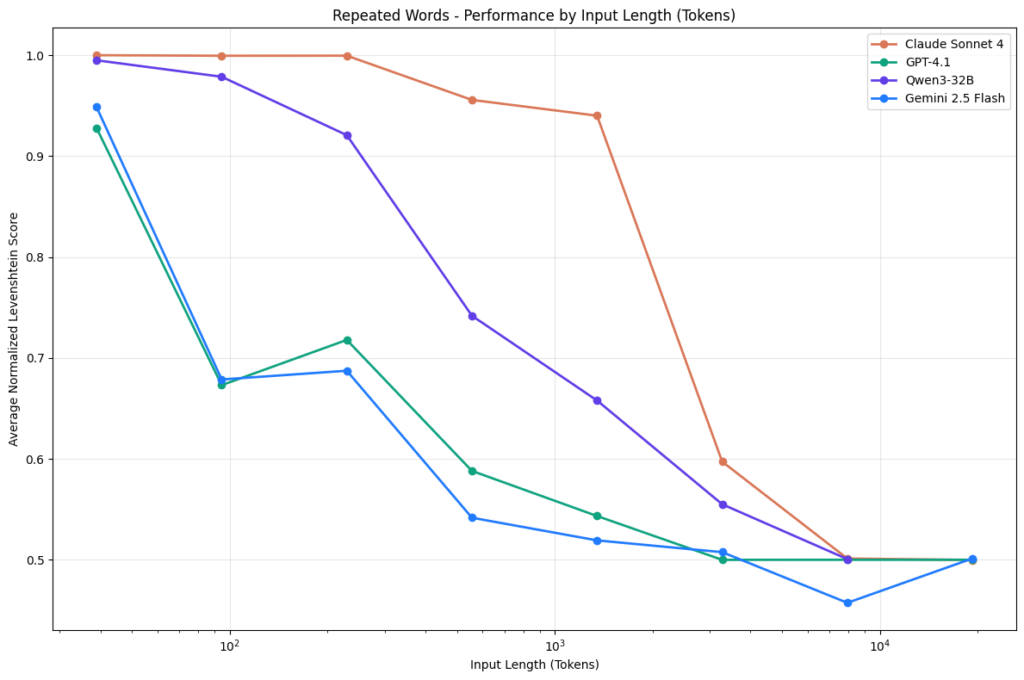
This is exactly what happened when I was running all tasks sequentially within the same Copilot session.
My Solution
There are several popular solutions to tackle this problem — one is the Ralph Loop Agent. In my case I found the answer in a model that uses an orchestrator, made possible by the introduction of sub-agents in GitHub Copilot.
The model is simple:
- Orchestrator — started in a Copilot session, it analyzes the tasks and decides which one to execute first
- Executor — launched by the Orchestrator sequentially, it receives one task at a time and runs each task in a clean session
This approach drastically reduces context rot, because every task starts from scratch, without the weight of context accumulated in previous iterations.
Another interesting advantage is the ability to use different models for the two phases. I use Claude Sonnet 4.6 for the Orchestrator — because on top of being cheaper, it has very strong agentic capabilities — and Claude Opus 4.6 or GPT 5.3 Codex for the Executor.
Once you’ve created the agent files described above, here’s how the workflow looks in practice:
- The Orchestrator appears as a custom agent in Copilot. After placing the agent files in the .github/agents/ folder, the Orchestrator will show up directly in the Copilot chat as a selectable agent.
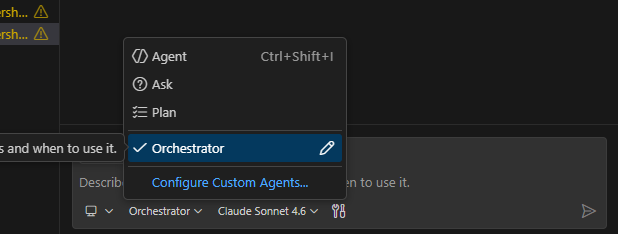
- Start it with a simple command. Select the Orchestrator agent and kick off the process with a prompt like start implementation. That’s all it takes — the Orchestrator will read the tasks/ folder and begin delegating.
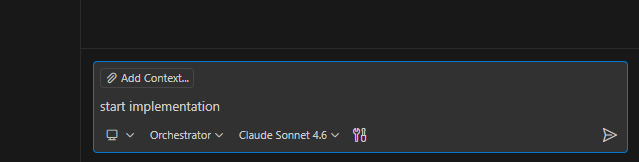
- Watch the sub-agents being invoked. In the chat you can follow in real time when and how the Orchestrator calls the Executor for each task, including the progress updates between one task and the next.
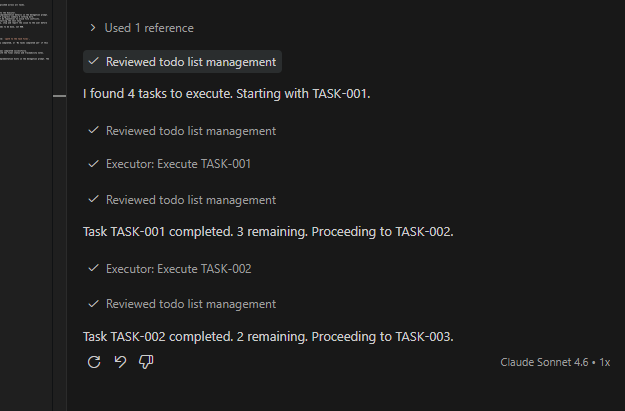
Before adopting the custom agents I was using the execute-all-tasks.prompt.md prompt, with an explicit instruction to invoke a sub-agent for each task. It works, but with limitations: I couldn’t, for example, force different models for the orchestration and execution phases.
⚠️ Important: before using custom agents, enable the related feature in VS Code, otherwise sub-agents might only work partially.
Conclusion
The Orchestrator-Executor model is not a complex solution, but it makes a concrete difference. Separating orchestration from execution, and running each task in a clean session, is the most effective way I’ve found to maintain high quality in generated code on projects of a certain size. If you work with Spec-Driven Development and feel that LLM performance drops after the first few tasks, it’s worth trying.
The orchestrator described here is intentionally simple, but it can be a solid foundation to experiment with more sophisticated setups. A few ideas to take it further:
- Parallel execution — instead of delegating tasks strictly in sequence, try running independent tasks in parallel where possible. Copilot supports it.
- Multiple specialized sub-agents — instead of a single Executor, you could build a richer network of agents with specific roles: an Architect agent for design decisions, a Test Expert agent for generating tests, and so on. The Orchestrator then becomes a real coordinator across different competencies.
- Shared progress file — have each sub-agent write a brief summary of what it did to a shared file like progress.txt, and pass it to the next agent as context. This way every sub-agent has awareness of what happened before, without loading the full conversation history. Controlled context, limited tokens.
Just keep an eye on token consumption and premium requests — in these setups they can scale up faster than expected.
Have fun with it.
